Road trip tracker apps compared
Roveri keeps every drive and ride you record: the route, your speed, the elevation and the weather along the way. On a trip of several days, the days come together as one journey on one map, each in its own colour, for free. Send it as a link anyone can open, or, with Roveri Pro, export it as a single GPX file.
Enroad, Wheelz, Open Road, Track My Journey, Drivio and ROADSTOCK are the other apps people look at for a road trip. Here is what each one is best at, and what Roveri does with the whole trip.

At a glance
| App | Recording | A trip of several days | Sharing and GPX |
|---|---|---|---|
| Roveri | You start each recording yourself when you set off; Roveri keeps the route, speed, elevation and weather. | A trip's drives and rides come together as one journey: every day in its own colour on one map, in order, with each day's weather. | Free: recording, journeys, and sharing as a picture or a link anyone can open in a browser. GPX export is part of Roveri Pro. |
| Enroad | Automatic, with driving-style stats | — | An image of each trip |
| Wheelz | Automatic, in the background | — | — |
| Open Road | Automatic, with a map of roads driven | — | A share card for a drive |
| Track My Journey | Start and stop a journey; can also log trips automatically | — | Live location; GPX export and trip reports |
| Drivio | Automatic, no account | — | Live location while you drive |
| ROADSTOCK | You start it, with Lock Screen and Dynamic Island | Folders, in ROADSTOCK+ | GPX import and export |
Facts about the other six come from their own App Store listings, checked on November 22, 2026; ”—” means the listing doesn’t mention it. Tiers and prices vary by region, so check each listing.
What Roveri does with a road trip
Every drive and ride, kept whole. Start a recording as you set off, by car or on a motorcycle, and Roveri keeps the route, your speed, the elevation and the weather along the way. Your journal holds the trips you chose to keep, not every run to the shop.
The days of a trip, together. Group a trip’s recordings into a journey and it becomes one map with each day in its own colour, in order, with each day’s weather. Every day still opens as its own full recording. Grouping days into a journey walks through it.
Shared as a picture or a link. A picture of the trip for a chat, or a link anyone can open in a browser, no app needed. Both are free.
GPX from other apps, too. Open a GPX file from another app or device, and Roveri draws the route and adds that day’s weather where it’s available. Also free.
No account, no ads; your trips sync through iCloud.
With Roveri Pro you get the Coverage Atlas, which opens after your first three recordings: every road you’ve recorded with Roveri on one map, filling in with each trip. One drive or a whole journey exports as one GPX file, one track per drive. Where to ride suggests places nearby with the weather hour by hour, and each drive gets deeper analysis.
One file for the whole trip, without merging
When an app keeps and exports each drive on its own, a three-day trip is three separate drives. To see it as one route, people export each day’s GPX and merge the files in another tool. In Roveri the days join up in the app: one journey, one map, and with Roveri Pro one GPX file for the whole trip. Exporting a whole road trip as one GPX file shows how.
A real trip, start to finish
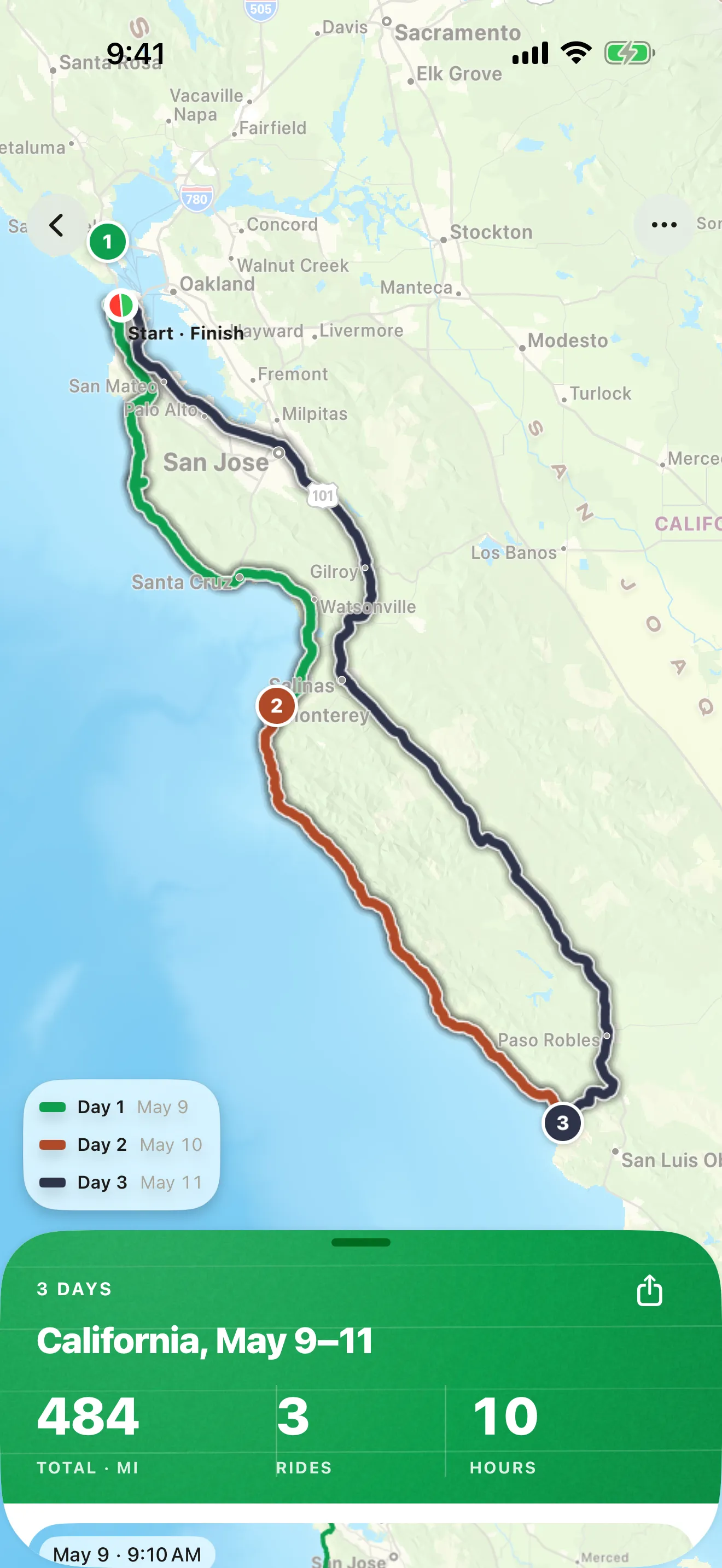
Here is the journey in the screenshot above. Three days in California, May 9 to 11: from San Francisco down past Monterey to the coast near Paso Robles, then back inland. Three recordings, one per day, 484 miles and 10 hours in all.
Afterwards it is one map in three colours, a legend naming Day 1, Day 2 and Day 3 with their dates, and a card for each day that opens that day’s full recording. Sent as a link, it opens in a browser with the same colours and legend.
The other six, in short
Enroad records on its own and leans towards how you drive: braking, cornering and G-force, with advanced stats in Enroad Pro (App Store).
Wheelz starts a trip in the background when you move, and adds a timeline, leaderboards and a garage for your cars (App Store).
Open Road saves every drive on its own and fills in a map of the roads you drive, with CarPlay, speed cameras and convoy chat (App Store).
Track My Journey is a travel log with notes and photos along the route, GPX export and a web Trip Dashboard (App Store).
Drivio records on its own with no account, matches your photos to the route and shares your live location while you drive (App Store).
ROADSTOCK is a detailed GPS logger you start yourself, with stop detection, a fuel and maintenance log, and folders for multi-day trips in ROADSTOCK+ (App Store).
How to choose
- You want a trip of several days kept as one, day by day, sent as a link and, with Roveri Pro, exported as one GPX without merging: Roveri.
- You care most about driving style or leaderboards: Enroad or Wheelz.
- You want notes and photos along a travel log: Track My Journey.
On a motorcycle? The best motorcycle apps for iPhone compares the apps riders weigh up.
Common questions
What is the best road trip tracker app for iPhone?
For a trip of several days, Roveri: it keeps every drive and ride with its route, speed, elevation and weather, and joins the days into one journey on one map, for free. You can send the trip as a link anyone can open, or export it as one GPX file with Roveri Pro.
Which road trip tracker records automatically?
Enroad, Wheelz, Open Road and Drivio say they record drives on their own. Roveri records the drives and rides you start, so your journal holds the trips you meant to keep.
Which app keeps a multi-day road trip together?
Roveri, for free: the days of a trip become one journey, each day in its own colour on one map, and each day still opens as its own recording.
How do I get one GPX file for a whole road trip?
In an app that exports each day separately, you merge the files in another tool. In Roveri you group the days into a journey and, with Roveri Pro, export it as one GPX file with one track per drive.
Is sharing my live location the same as sharing a trip?
No. Live location shows where you are while you drive. Roveri shares a trip you have recorded, as a picture or as a link anyone can open in a browser.
Roveri runs on iPhone (iOS 18.6 or later) and is free to download, with an optional Pro tier. Read the fact sheet on the Roveri press page, or get Roveri on the App Store.