How to combine the rides of a motorcycle tour into one trip
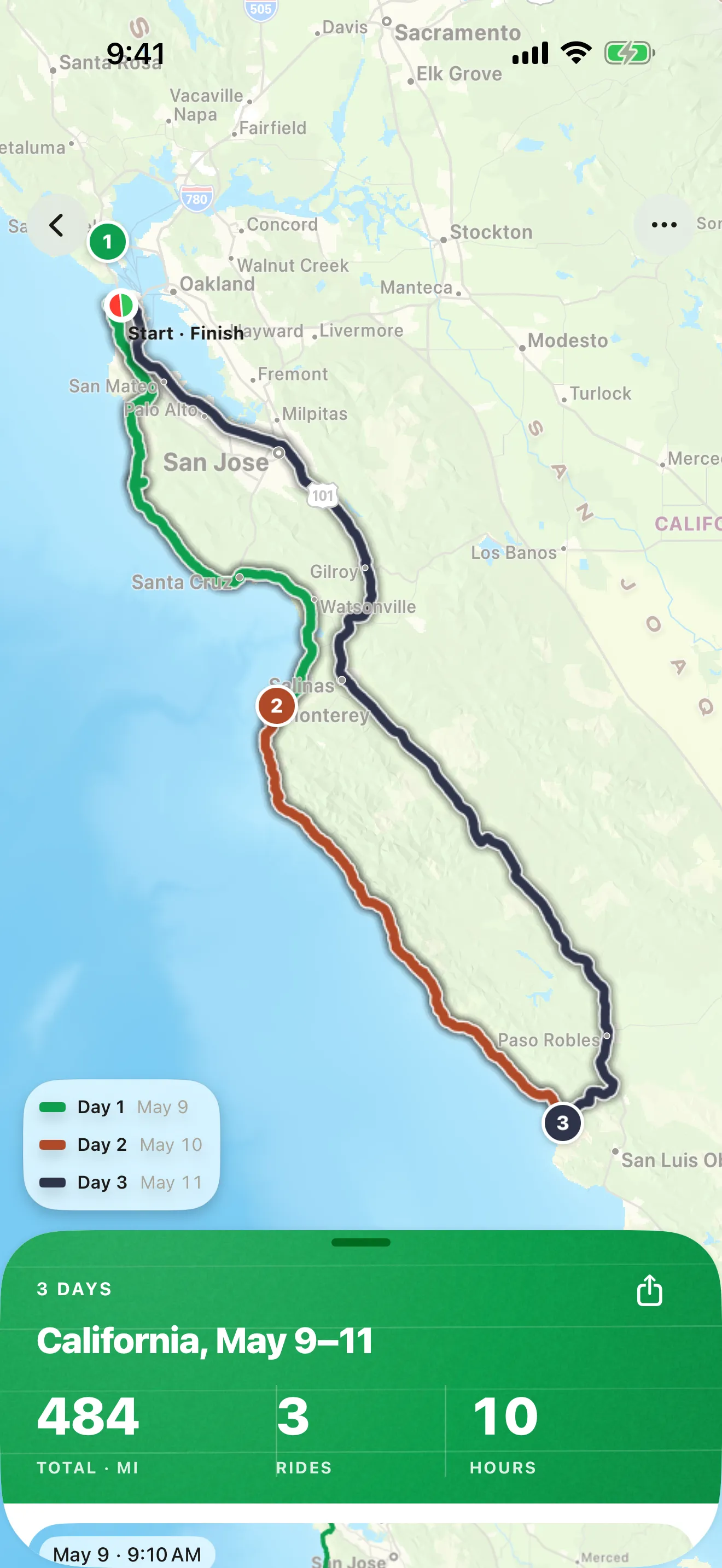
Group the legs into a journey: one map of the whole tour, every ride in order, and nothing merged. On a tour you get off the bike every evening, so every riding day is at least one ride of its own: the tour above, San Francisco down the coast past Monterey and then back inland, was ridden as one ride a day, three rides in three days. In Roveri you record each leg the way you always do, and afterwards the rides of that tour sit together as one journey.
Every ride keeps its own stats. The journey draws each day as its own line on one map and adds up the distance, the rides and the hours, while each leg keeps its own distance, moving time, top speed, climb and weather, one tap away. Grouping is free, it changes none of your totals, and ungrouping gives every ride back exactly as it was.

Why a tour turns into five separate rides
A ride is recorded from the moment you tap Start ride until you press and hold End · hold, and a motorcycle tour is never one sitting. You ride to the coast, park the bike at the guesthouse, ride the pass the next morning, take a rest day in the middle, and come home on the fifth day. Each of those legs is a ride with its own route, its own weather and its own numbers, and that is correct: the evening with the bike on its side stand is not riding, and a recorder that kept running through it would count a night parked as part of the road.
The cost shows up later, when you look back. In a list of rides the tour is five separate entries, sitting among the commutes and evening loops of the same week. Nothing on any one of them says that they belong together, and the map of each one shows only its own leg. The tour itself — where it started, how far it went, the shape it drew across the country — is the one thing the list cannot show, because no single ride holds it.
What merging GPX files costs you
The usual workaround is to merge the files. Free web tools such as gpx.studio and GPS Visualizer can merge several tracks into one file, and they do that job well: they are file utilities, and one tidy file is exactly what they are for.
gpx.studio can also keep the days as separate tracks inside one file. A journal asks for something else. Joined into one continuous track, five days become one long ride, so the stretch between where you stopped one evening and where you set off the next morning is part of that line, and whatever opens the file sees one trip with one distance and one time where you rode five days.
On Strava, merging is done outside the app. Its help article on merging activities says to export the originals, combine them with a third-party tool, delete the originals and upload the result — and it is plain about the price:
“you will lose all the kudos and comments on those activities.”
That is a fair rule for a training log, where one activity is one workout. A riding journal keeps every leg as it was and adds the tour on top.
Make a journey in Roveri
There are three ways in, and none of them asks you to plan anything before you ride off.
After a ride, from Home. When you finish a long ride — a hundred kilometres or three hours — and the ride before it was long too and ended within about eighteen hours, Home asks: Two days on the road. Make it a journey? If the ride before is already part of a journey, it offers to add this one to it instead. It only suggests; nothing is grouped until you say so.
From History. Tap + Journey, pick the rides of the tour, and tap Make a journey. This is the way in for a tour you rode last summer, or a weekend of short legs that did not trigger the suggestion.
From a ride. A ride’s menu has Add to journey…, which lists the journeys within three days either side of it, for the ride you forgot to include.
A journey takes two rides or more, up to sixty, all from your own journal.
What the journey shows
The journey opens on one map of the whole trip. Each day is drawn as its own line, so the map shows the road you rode and nothing else: there is no line jumping from the place you stopped one evening to the place you set off the next morning, because nobody rode that.
Each day also has its own colour, and a small legend names them: Day 1, Day 2, Day 3, each with its date. The colours are the same on the shared journey page at roveri.app, which colours its route by day and carries the same legend, so the person you send the link to can tell the days apart without a word from you.
Below the map, in a sheet, sits the trip in figures: how many days, where and when, the total distance, the number of rides and the hours on the road. Under those figures there is a card for each day, with its date and the time you set off, and tapping a day opens that ride with its full map, its numbers and its weather, the same as it always was.
The title is the trip itself: the region most of the rides were in and the dates, such as Tuscany, Aug 28–30, or Journey with the dates where no region stands out. In History one journey card stands in for its rides, and each ride inside it carries a line that says Part of and the journey’s name, so it always points back to the trip. Journeys sync across your devices through iCloud with the rest of your journal.
Every ride keeps its stats
On a tour the legs are rarely alike: the day over the pass may climb more than the rest of the trip together, the coast day may be the one in the rain, and the motorway day home is often the fastest and the dullest. That is why the journey never merges them. Open the day of the pass and its ride shows its own climb and top speed; open the wet day and its weather is the weather of that leg, not an average of the tour.
A journey is a way of looking at rides, not a new ride. It holds a list of the rides that belong to the tour and nothing else, so every ride is counted once, exactly as before you grouped it. Your lifetime distance, your hours, your records and your rides do not move when you make a journey, and they do not move when you take one apart.
The same goes for everything built on your rides. The squares of the Coverage Atlas are the squares you rode, whichever journey a ride sits in, and the monthly Rewind story counts the same rides with the same figures.
Days are counted as the days you set off, in local time, so two rides on one day make one day of the trip, and a long weekend of five rides over two days reads as two days. Ungrouping a journey keeps every ride: they go back into History as single rides, with nothing trimmed and nothing lost.
Share the whole tour
A journey shares the way a single ride does, as a whole tour.
The image is the same editor the ride card uses, on a photo or on the map of the trip, and it is free. The link is free too: it opens a page at roveri.app with the whole trip, in any browser, with nothing to install on the other end — the journey version of sending a ride as a link. A link needs at least two rides that still have a route after the privacy trim. The GPX file puts the whole tour into one file with one track per ride, and it is part of Roveri Pro.
Privacy is one setting for the whole tour. The trim you choose cuts the start, the finish or both of every day, so the places where you slept stay off the map while the roads between them stay on. A day too short for that trim is left off the link, and the share screen names it. By default the top speed is hidden and the first 500 m of every day are trimmed, and a live link follows the settings: change one and the shared page changes with it.
A journey, a merged file and separate activities
How the three ways of keeping a multi-day motorcycle tour compare.
| Roveri journey | Merged GPX file | Separate activities in Strava | |
|---|---|---|---|
| One map of the trip | Yes, each day its own line | Yes, in whatever app opens the file | Each activity on its own map |
| Figures for each day | Yes, a card per day that opens the ride | Gone once the tracks are joined into one | Yes, each activity keeps its own |
| Overnight jumps | Not drawn | Part of the line once the tracks are joined into one | Not drawn, each activity stands alone |
| Original rides kept | Yes, every ride stays a full ride | The source files stay | Yes |
| One file out | One GPX, one track per ride (Roveri Pro) | Yes, that is its job | Through a third-party tool, per Strava’s help |
JOURNEYS
One tour, one map.
Group the rides of a tour into a journey and Roveri draws them on one map, each day its own line, with the tour's distance, rides and hours in a sheet below it and a card for every day under them. Every ride keeps its own stats, is counted once, and opens on its own from the journey.
- Suggested on Home after two long days on the road, or made from History in a few taps
- Days are the days you set off, so two rides on one day count as one day of the trip
- Share it as an image or a link, free, or as one GPX file with a track per ride in Roveri Pro
Common questions
Do I need Roveri Pro to make a journey?
You do not. Making a journey, viewing it, and sharing it as an image or as a link are free for every rider. The one part that belongs to Roveri Pro is exporting the whole trip as one GPX file, with one track per ride.
Can rides from the same day form a journey?
Yes. A journey needs two rides or more, not two days. Days are counted as the days you set off, in local time, so a morning ride and an afternoon ride on one day make a journey of one day with two rides.
Does grouping rides into a journey change my stats?
It does not. A journey only lists the rides that belong to the trip, so every ride is counted once, as before. Your totals, records, Coverage Atlas squares and Rewind figures stay exactly the same, and ungrouping keeps every ride.
Can I rename a journey?
Not yet. The title comes from the trip itself: the region most of its rides were in and the dates, such as Tuscany, Aug 28–30, or Journey with the dates where no region stands out.
What happens to a shared journey if I delete one of its rides?
The link is taken down. Deleting a ride that is on a shared journey removes that journey's page at roveri.app, so the link stops showing a ride you chose to delete.
Can rides imported from a GPX file join a journey?
No. A journey is made from the rides you recorded in your own journal. Rides you open from a GPX file live in their own Imported section and stay out of journeys, the same way they stay out of your totals.
Keeping a road trip as a day-by-day journal, by car or on the bike, from departure to the last day? See how to keep a multi-day road trip day by day.
Journeys are part of Roveri, the iPhone app that records every drive and ride (iOS 18.6 or later), free to download with an optional Pro tier. Recording rides, your full history, journeys, the route map with its lanes and arrows, the ride card, the shared link and the whole monthly Rewind story are free; Pro adds the Coverage Atlas, a per-ride elevation profile, the climate measured along your route, GPX export for rides and journeys, and Where to ride. Read the full, code-verified fact sheet on the Roveri press page, or get Roveri on the App Store.