How to send someone a link to your motorcycle ride
Open the ride in Roveri, tap Share ride, and create a link. It opens a page at roveri.app with the map, the numbers and the weather of that day — in any browser, with nothing to install and no account on the other end. The map is live rather than a picture of one: the person you sent it to can zoom into a corner, switch the route between elevation and road type — and speed too, if you left your top speed on the page — and read it in their own language.
You decide what travels with the link — and Roveri decides first. Both privacy controls ship on: your top speed is hidden, and 500 m is cut from each end of the published route. Widen that trim to 1 km, 2 km or 5 km, turn either control off, and change your mind later without breaking the address you already sent. Sending a ride as a link is free; attaching the GPX file to the page is part of Roveri Pro.
Where the link comes from
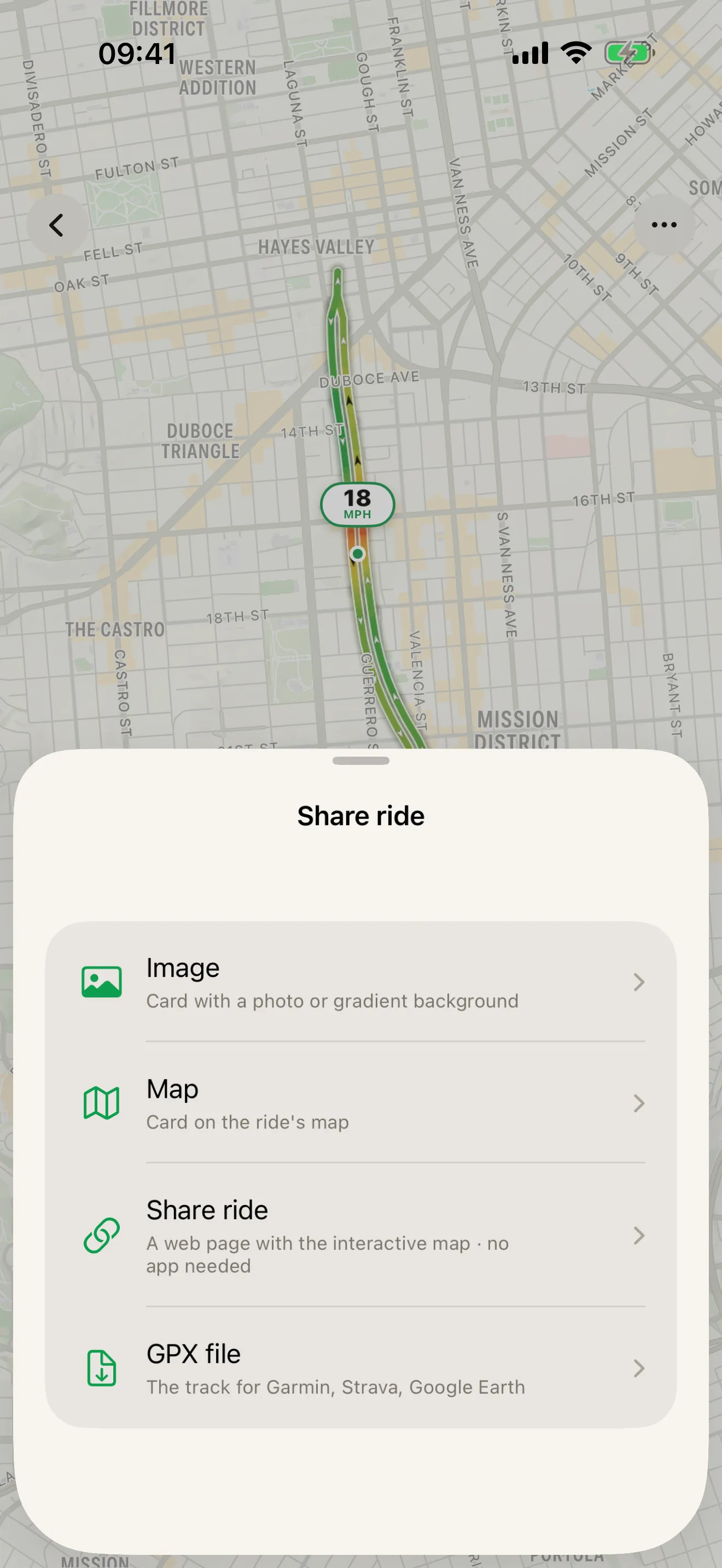
Every ride in Roveri has one share button, and it opens a sheet with four doors: Image, a card over a photo or a gradient; Map, a card on the ride’s own map; Share ride, the web page this guide is about; and GPX file, the raw track for another app.
Pick Share ride and you land on a screen that shows what the recipient will
get, with the privacy controls sitting directly under it. Tap Create link
and Roveri uploads that ride — as you have set it, not as you recorded it — and
hands you back an address of the form roveri.app/r/ plus eight characters. From
there, Share… puts it into the normal iOS share sheet, and Copy link
drops it on the clipboard for whatever you were typing into.
The whole point of the shape is that the other end does nothing. A card is a picture, which is right for a feed; a link is a place, which is right for the one person who actually wants to look at where you went.
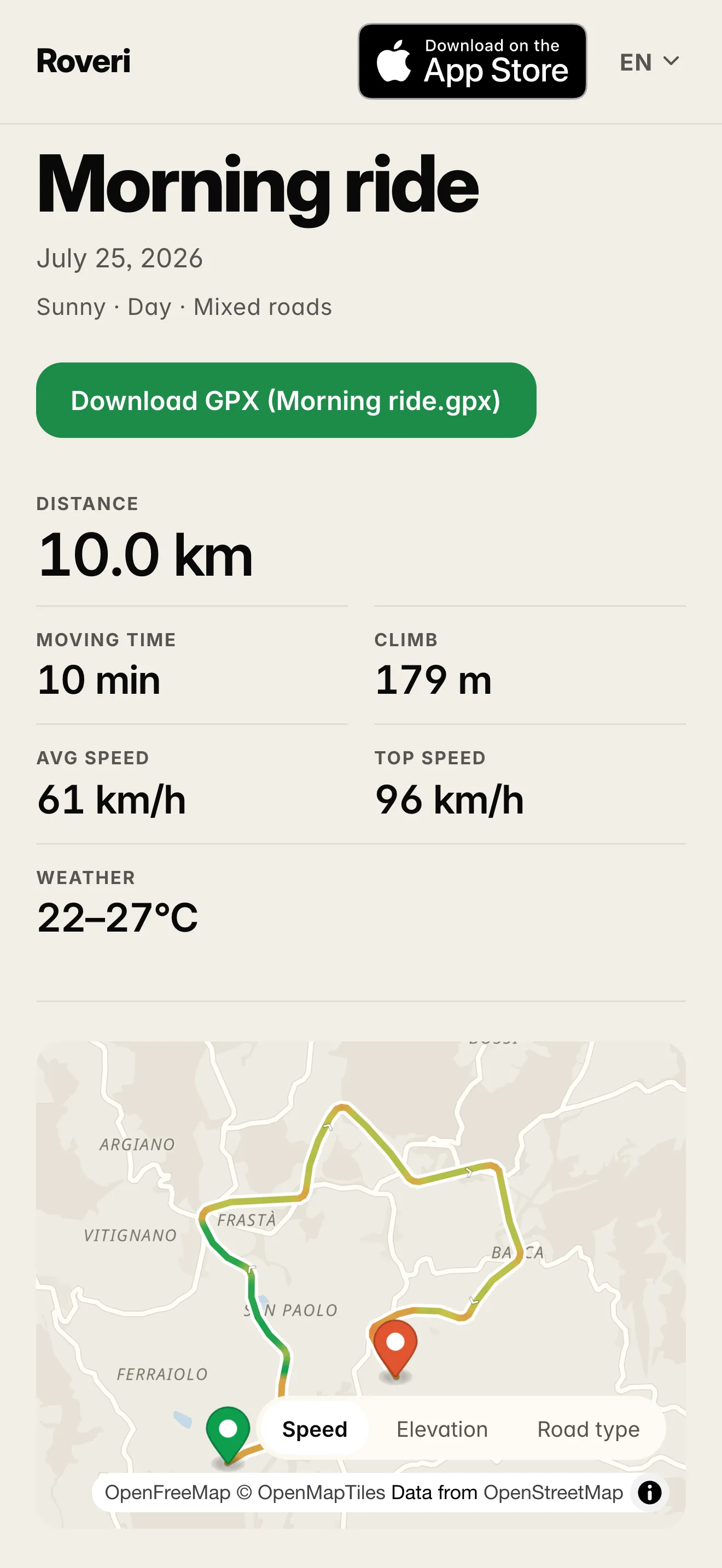
What the other person sees
They open a web page, on a phone or on a laptop, and it carries:
- The ride’s name and date. The name comes from the places — Siena → Siena for a loop, the two towns for a ride across — or from the title you gave it.
- A one-line summary of the day, the same one the app shows: how the ride felt, whether it was day or night, and what kind of roads it was.
- The numbers. Distance, moving time, climb, average speed and the temperature range you rode through — and your top speed, if you turned Hide top speed off before minting the link.
- The route on a live map, with up to three layers to switch between — Speed, Elevation and Road type — direction arrows along the track, and a marker at each end. A page that hides your top speed drops the Speed layer with it and opens on Elevation. A ride that doubles back draws both passes as separate lanes, exactly as it does in the app.
- A “How it rode” card: the split between urban, highway and mixed roads, the split between daylight and dark with that day’s sunrise and sunset, and the weather.
And it comes in their language. The page reads the browser’s own setting and renders in any of the nine languages Roveri speaks, with a switcher in the corner for anyone who wants a different one — so a ride you send from Munich to a friend in Lisbon arrives in Portuguese without you doing anything.
Privacy is the real subject here
A link is a page on the open web, so the interesting question is not how to make one. It is what you are handing over, and the app puts that decision in front of you before the link exists rather than after.
Hiding the exact start and finish. Hide start & finish is already on, at 500 m. Leave it there or pick 1 km, 2 km or 5 km instead, and Roveri cuts that much off each end of the published route, not off the total. The page then draws a ride that begins and ends on open road, which is the usual reason people hesitate to post a ride at all. Be clear about what it does and does not do: it hides the addresses, not the geography. The towns still name the page, and a short ride may be too short to trim at that distance, in which case the app says so and asks you to lower it or turn the trim off.
Hiding your top speed. Hide top speed is on as well, and it takes the number out of the stats and the Speed layer off the map entirely — the page opens on Elevation instead, and there is no speed colouring for anyone to read a figure back out of. One honest caveat, which the app itself prints under the toggle: a GPX file carries timestamps, so a recipient who can download the file can work speed out from it whatever this toggle says. The page alone carries no per-point times, which is exactly why the toggle is worth something — and why the two controls in the next section are worth setting together.
What the page never carries. The note you wrote on the ride is not uploaded. No name, no account and no profile are attached to the page: it is a ride, not a rider. The link is an unguessable eight characters, so nobody arrives at it by trying; but anyone holding it can open the page, and once the address is posted somewhere public a search engine can find it like any other page. Both halves of that are true at once, and the app says so on the same screen.
The GPX file, which is the one Pro part
Under the privacy controls sits Include GPX file. With Roveri Pro, turning it on gives the page a Download GPX button named after the ride, so the person on the other end can pull the track into Garmin, Strava, Google Earth or anything else that reads GPX. Turn it off and the page shows the ride while the file is kept in the app. Without Pro, the page is shared the same way and simply carries no download button.
Sharing the ride as a link is free, and always has been. Pro is what puts your recorded track in someone else’s hands as a file.
Changing your mind
Two different things live under that word, and the difference matters because one of them is permanent.
Update page keeps the address. Change a privacy control on a ride you have already shared and the app tells you the live page still has the old settings, and offers to update it. Tapping that re-uploads the page in place: same link, new settings, and the message you sent last week keeps working. Widening a trim no longer costs you the address — the text and the numbers are current on the next load, while the preview card and the map geometry can trail by up to an hour in shared caches.
Stop sharing is a revocation. The page stops answering for everyone who has the link, including people you sent it to months ago, and sharing that ride again mints a new address — never the old one back. Deleting the ride from your journal stops its link the same way. In your history, every shared ride carries a Shared badge and the Shared filter lists them all, so the set of links you have out there is one tap away rather than a thing to remember.
How long a link lives
As long as you leave it up. There is no expiry date on a shared ride and no renewal to forget: the page sits at its address until you stop sharing it or delete the ride. When you do stop, the page itself flips over immediately, and the cached copies at the edge of the network follow within the hour.
A link or a card?
They answer different questions, which is why Roveri ships both. Send a link when one person actually wants to look at the ride — the map is live, the numbers are all there, and they can pull the GPX if you let them. Make a ride card when you are posting to a feed, where an image has to carry the whole story in one glance and a link would just be a blue line of text nobody taps.
SHARE RIDE
One ride, four doors.
The share sheet on a ride offers a card over a photo, a card on the map, a web page with the interactive map, or the GPX file itself. The web page is the one that needs nothing on the other end: it opens in any browser, in the reader's own language, with the route live rather than flattened into a picture.
- Create the link, then Share… or Copy link — the standard iOS share sheet
- Hide start & finish and hide top speed are already on — change them before the page exists
- Update the page in place, or stop sharing it, at any time
Common questions
Does the other person need the app?
No. The link opens an ordinary web page in any browser, on a phone or a laptop, with nothing to install and no account to make. The page reads the browser’s own language setting and renders in any of the nine languages Roveri speaks, and it carries an App Store badge for a reader who wants the app afterwards.
Can I stop sharing?
Yes, at any time, from the ride’s Share ride screen or from the Shared filter in your history. Stopping is permanent: the page stops answering for everyone you sent the link to, and sharing that ride again mints a new address rather than reviving the old one. Deleting the ride from your journal stops its link the same way.
Does the link change if I edit the ride?
The address survives. When a ride you have already shared no longer matches its live page, Roveri offers Update page, which re-uploads the page in place — same link, new content. The text and the numbers are current on the next load, while the preview card and the map geometry can trail by up to an hour in shared caches.
What exactly does the page show?
The ride’s name and date, a one-line summary of how it felt, the distance, moving time, climb, average speed and temperature range, the route on a live map with Elevation and Road type layers, and a How it rode card carrying the road split, the daylight split with sunrise and sunset, and the weather. Top speed and the Speed layer appear only if you turned Hide top speed off before minting the link, because it ships on. The note you wrote on the ride is not uploaded, and no name or account is attached to the page.
Is it indexed by search engines?
It can be, once the address is public. A shared ride is an ordinary web page and carries nothing to hold search engines off, so a link posted on a forum or a profile can be found like any other page. The link itself is eight unguessable characters, so a ride you send to one person is between the two of you until one of you publishes the address.
Sending a ride as a link is part of Roveri, a riding journal for iPhone (iOS 18.6 or later), free to download with an optional Pro tier. Recording rides, your full history, the route map with its lanes and arrows, the ride card and the shared link itself are free; Pro adds the Coverage Atlas, a per-ride elevation profile, the climate measured along your route, GPX export and the Download GPX button on a shared page, Where to ride, and the rest of the monthly Rewind story. Read the full, code-verified fact sheet on the Roveri press page, or get Roveri on the App Store.